
Short answer: A courtroom sound system does more than make speech audible in the room. It decides how much of a proceeding survives as the official record. Systems that mix every voice into one channel lose overlapping speech, speaker identity, and any visual context. Digital A/V recording captures each microphone separately and syncs it to video, which produces a record that can be searched, attributed, and defended later.
A witness answers quietly. The judge asks her to repeat it, and the hearing moves on. Two weeks later, someone transcribing that proceeding plays the same few seconds over and over and finally types “inaudible.”
That gap can hold up an appeal, send a matter back for rehearing, or leave a party without the record they are entitled to. The cause is rarely a careless operator. Most of the time it is a courtroom audio system that was never built for the room it sits in.
What a Courtroom Sound System Is Actually Responsible For
A standard courtroom sound system has two jobs that pull in different directions. It has to make speech intelligible for everyone present, and it has to feed a clean signal to the recording equipment that preserves the official verbatim record. A conference room speaker setup can handle the first job. Only purpose-built audio equipment handles both at once.
Why a PA System Is Not the Same as Voice Lift
A public address system pushes volume. That works for an auditorium and causes problems in a courtroom, where a raised voice from the bench can bleed into the witness microphone and where feedback loops build fast in a hard-surfaced room.
Voice lift takes a different approach. It raises speech just enough to cover the natural loss over distance between the witness stand, the counsel table, the jury box, and the bench. The jurors in the back row hear the same testimony as the court reporter sitting six feet away. Nobody in the gallery notices the system is running, which is the point.
Microphone Placement Decides Everything Downstream
Courtroom audio quality is set at the microphone, not in software. A gooseneck microphone at the bench, boundary microphones on each counsel table, and dedicated coverage at the witness stand and the podium give the system distinct sources to work with. Placement also gives you something a single-room microphone never can: the ability to tell who was speaking based on which microphone picked them up.
Where Conventional Court Recording Runs Out of Room
Plenty of courts still run on equipment that mixes every voice in the room into one audio channel. That approach works until two people talk at once, which in a contested judicial proceeding happens constantly.
Here is what a single-channel setup cannot do:
- Separate overlapping speech: When an objection lands mid-answer, both voices sit on top of each other permanently. There is no way to pull them apart later.
- Isolate background noise: HVAC cycling, a rolling chair, papers shuffling at the counsel table, all of it is baked into the same track as the testimony.
- Identify the speaker: A transcriptionist working from mixed audio has to infer who said what from context, and gets it wrong when voices are similar.
- Show what was displayed: Audio recording alone tells you an exhibit was discussed. It does not show what appeared on the screen.
- Support a search: Finding one exchange in a six-hour proceeding means scrubbing through a timeline by hand.
Those gaps do not usually surface on the day of the hearing. They surface weeks later, when court staff are trying to fill a transcript request against a deadline.
How Digital A/V Recording Changes the Math
Digital A/V capture records each microphone to its own channel and syncs those channels to video of the courtroom. The difference in what the record contains is not subtle.
| Capability | Traditional audio recording | Digital A/V recording |
| Audio channels | One mixed track | Separate channel per microphone |
| Crosstalk handling | Voices permanently overlapped | Individual speakers isolated after the fact |
| Speaker attribution | Inferred by the listener | Tied to microphone location |
| Visual context | None | Synced video of the room and participants |
| Evidence capture | Not included in the record | Document camera and laptop feeds captured |
| Navigation | Manual scrubbing | Time-stamped, searchable index |
| Annotation | Separate paper log | Notes stamped into the recording in real time |
| Remote participants | Not supported | Captured on the same record as in-room audio |
The practical result for court officials is that the record answers questions it could not answer before. Who objected. What the presiding judge said off the ruling. What page of the exhibit was on the screen when the witness identified it.
The Video Portion Matters More Than People Expect
Video recording is often treated as a nice extra. In practice, it resolves the arguments that audio alone leaves open. A gesture toward a diagram, a witness pointing at a photograph, an attorney handing a document to the court clerk: all of it becomes part of the record instead of a note someone hopes they remembered to write down.
What This Means for Transcription Work
There is an important distinction worth keeping straight. Speech recognition software produces an AI-generated transcript, which is a working draft. It becomes a certified transcript only after a qualified human reviews and corrects it. That review step is where recording quality pays off or costs you.
Speech recognition accuracy drops sharply on overlapping speech, distant microphones, and heavy room noise. Feed the same software separated channels captured close to each speaker and the draft comes back cleaner, which means less correction time and faster turnaround on requests. The audio solution is doing most of the work before the software ever runs.
Accessibility Across the Whole Courtroom
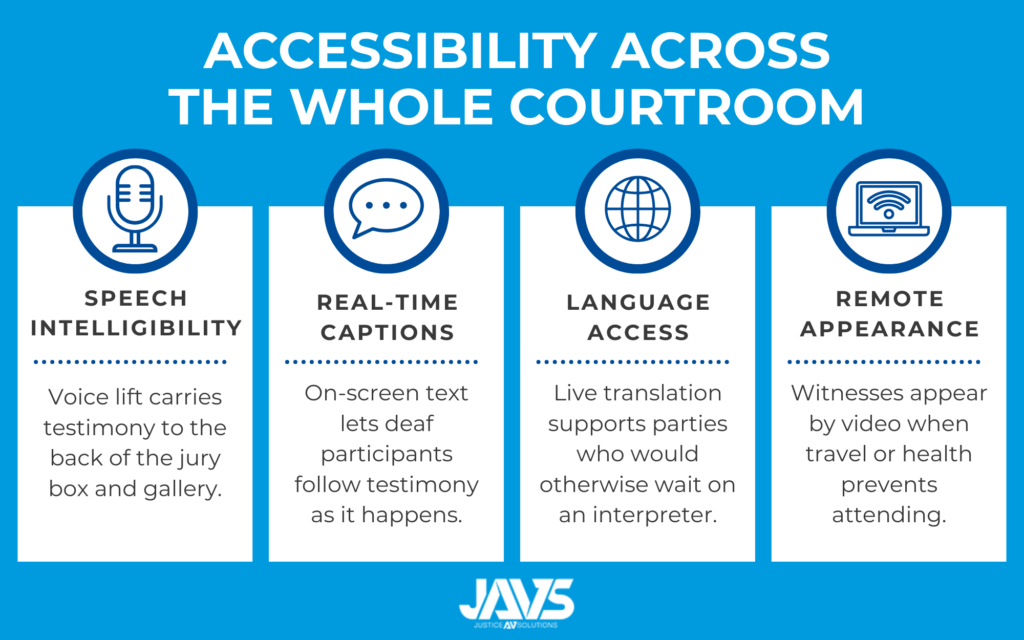
Better audio serves participants who have the hardest time following a court proceeding. A few pieces work together here:
Speech Intelligibility
Voice lift helps anyone with mild hearing loss, which includes a meaningful share of jurors and members of the public in any given room.
Real-time Captions
On-screen text during an active session gives deaf and hard-of-hearing participants access to testimony as it happens rather than after the fact.
Language Access
Live translation into additional languages supports parties and observers who would otherwise depend entirely on interpreter availability.
Remote Appearance
Hybrid courtroom capability lets a witness, an interpreter, or a party appear by video conference when travel or health makes attendance difficult, with that audio captured on the same official record as everyone in the room.
Evidence Presentation Belongs in the Record
Federal and state courts have moved toward electronic exhibits as the default. Courts like the U.S. Bankruptcy Court for the District of Maryland now require exhibits to be pre-filed as separate PDFs and displayed electronically during hybrid hearings, with the court’s own recording serving as the only authorized record of the proceeding.
That raises a question a lot of standard courtroom setups cannot answer: if the exhibit was shown on a screen, is it in the record?
With an integrated video system, it is. A document camera captures physical evidence. Laptop connections at each counsel table let attorneys display files from their own laptop to the jury box, the bench, and the gallery monitors. Those feeds are captured alongside the audio, so the recording reflects what the jury actually saw. Evidence presentation equipment that lives outside the recording system leaves a hole that no amount of good audio fills.
What Court Administrators Should Look For
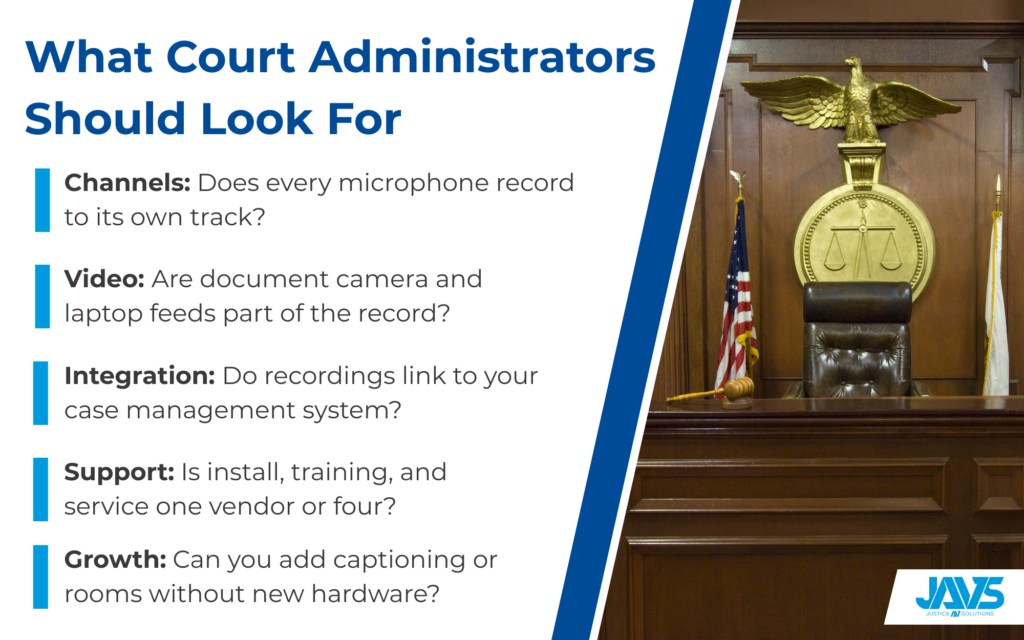
- Ask how many audio channels the system records and whether each microphone gets its own.
- Confirm that video sources, including the document camera and counsel table laptop feeds, are captured as part of the record.
- Check whether the software is web-based and how court staff access recordings from their own machines.
- Ask about integration with your existing case management system so recordings link to case data automatically.
- Find out who handles installation, training, and service, and whether that is one company or four.
- Confirm the system can add captioning, hybrid capability, or additional rooms later without replacing the core hardware.
Courts buy this equipment roughly once a decade. The specification you write now is the one you live with through several administrations.
Why JAVS
Working a case means going back through small details, often months after the fact, and the record is where those details either sit waiting or quietly disappear. Justice AV Solutions (JAVS) builds for that specific failure, capturing every microphone on its own channel and writing it straight into the official record. JAVS has built courtroom-specific AV for more than 40 years, with systems in over 10,000 courtrooms across the United States and 17 countries.
JAVS systems handle every layer of courtroom AV in one platform:
- Recording and capture: Multi-channel audio and synced video recording that keeps each microphone on a separate track for clean speaker attribution
- Voice lift: Speech amplification tuned for courtroom acoustics, raising audio levels for the jury box and gallery without feedback or echo
- Audio hardware: FlexMic and gooseneck microphones, HD cameras, and the AXIO digital mixer, all designed and manufactured for the courtroom rather than adapted from conference room gear
- Transcription and captioning: AI-powered transcription and real-time on-screen captions generated directly from the recorded audio
All recordings are stored with encryption and are searchable by case number, date, or keyword, which simplifies retrieval for appeals, case resolution, or public records requests. JAVS designs, manufactures, installs, and services its own equipment, so court staff get one number to call rather than a chain of vendors pointing at each other.
Contact us today for a free consultation to discuss how a courtroom sound system can support your court’s record.