
Every person who walks into a courtroom deserves to understand what is happening and to be heard. That includes the presiding judge, attorneys at the counsel table, witnesses, jurors in the jury box, and members of the public. But for people with hearing loss, limited English proficiency, mobility challenges, or other disabilities, the traditional courtroom can create real barriers to equal access.
Courtroom accessibility goes beyond meeting the minimum legal requirements of the Americans with Disabilities Act. It means making sure every participant can follow testimony, review evidence, and engage in the court proceeding fully. Modern AV technology has made it easier than ever for courts to close these gaps and serve all court users effectively.
Why Courtroom Accessibility Matters
Access to the court system is a right. When someone cannot hear oral arguments, read displayed evidence, or physically enter courtroom areas, their ability to participate in justice is compromised.
The Legal Responsibility
Courts in the judicial branch at the federal, state, and local levels share a responsibility to provide reasonable accommodation. Common disability accommodation requests include:
- A sign language interpreter for deaf participants
- An assistive listening device for those with hearing loss
- Documents provided in an alternative format (large print, digital, etc.)
- An accessible entrance and navigable courtroom areas for wheelchair users
Court services teams and access coordinators handle these accommodation requests daily. The right technology can reduce the administrative burden involved and help courts respond within a few business days.
Beyond Formal Accommodation
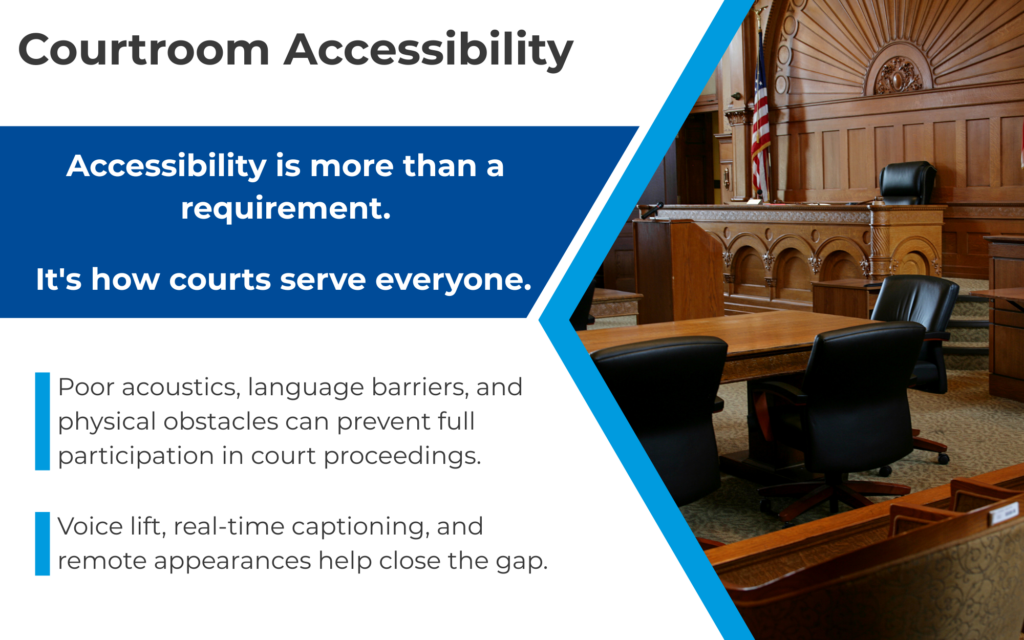
Poor room acoustics, soft-spoken witnesses, and background noise can make it difficult for anyone to follow what is being said. Improving courtroom accessibility benefits all participants, not just those who have filed a formal request.
Common Courtroom Accessibility Challenges
Understanding the barriers people face is the first step toward solving them.
| Challenge | Who It Affects |
| Poor speech intelligibility | Jurors, gallery observers, remote participants, and anyone far from the speaker |
| No real-time captioning | Individuals who are deaf or hard of hearing, non-native English speakers |
| Physical barriers to entry | Wheelchair users who need accessible parking, an accessible entrance, and navigable courtroom areas |
| Language barriers | Non-English speakers who need language interpreters or real-time translation |
| Inaccessible digital content | Individuals with visual impairments who rely on screen readers or alternative formats |
| Inability to attend in person | People with chronic health conditions, caregiving responsibilities, or transportation challenges |
Technology Solutions That Improve Accessibility
Advances in courtroom AV technology have created practical tools that courts can deploy to serve all participants. Here are the areas where technology makes the biggest difference.
Voice Lift: Making Every Voice Heard Clearly
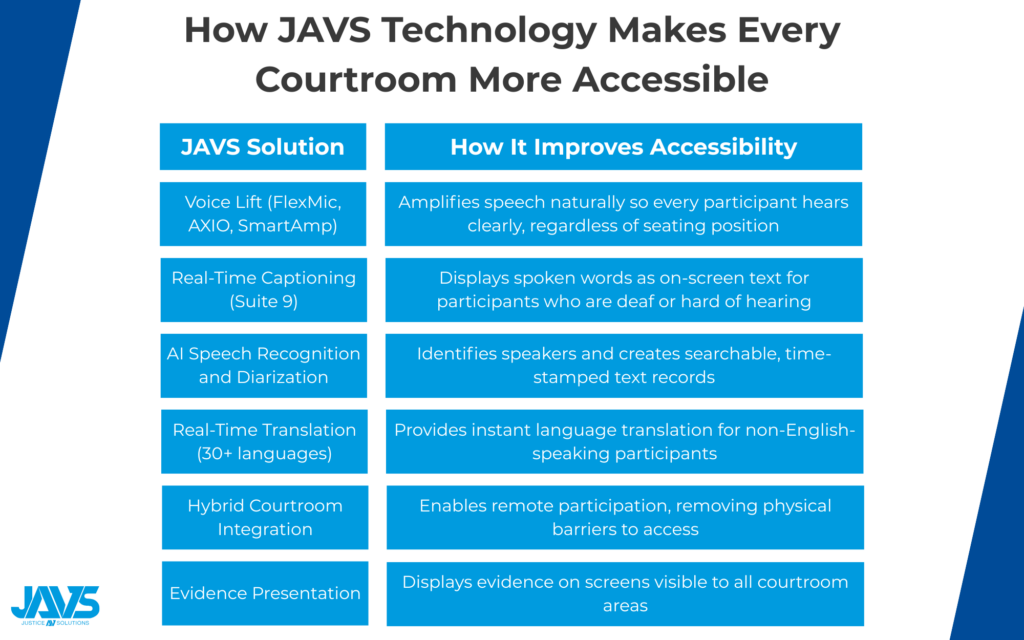
One of the most common accessibility issues in a courtroom is that people in the back cannot hear what is being said. Voice lift technology solves this by subtly amplifying speech from microphones at key positions. Unlike a traditional public address system, voice lift raises speech levels just enough to compensate for natural sound loss over distance, without feedback or distortion.
The JAVS Voice Lift Solution
Justice AV Solutions (JAVS) offers a purpose-built voice lift solution designed for courtroom environments. Key components include:
- JAVS FlexMic microphones with software-definable pickup patterns that adapt to different speaking positions
- JAVS AXIO digital mixer for real-time audio processing and speaker diarization
- JAVS SmartAmp for multi-zone amplification tailored to your courtroom’s acoustics
Together, these components deliver clear, natural-sounding speech to every seat in the room. Voice lift is especially helpful for participants who use hearing aids or assistive listening devices, since cleaner source audio makes those devices work more effectively.
Real-Time Captioning and AI Transcription
For participants who are deaf, hard of hearing, or processing audio in a second language, real-time captioning provides a visual text display of what is being said during a court proceeding. AI-powered speech recognition has made this far more practical and affordable than it used to be.
How JAVS Suite 9 Delivers Captioning
JAVS Suite 9 software includes several built-in captioning and transcription features:
- Real-time captions displayed as on-screen text during active proceedings
- AI-powered speaker diarization that identifies who is speaking based on microphone location
- Real-time translation into more than 30 languages for non-English-speaking participants
Hybrid Courtroom Technology and Remote Appearances
Not every accessibility barrier exists inside the courtroom. For people with mobility limitations, chronic health conditions, or those who live far from a provincial courthouse or federal court, getting to the building can be the biggest obstacle. Hybrid courtroom technology allows participants to join proceedings remotely via video conferencing, giving people with disabilities or transportation limitations an alternative way to participate in the court proceeding.
JAVS Hybrid Courtroom Integration
JAVS hybrid courtroom solutions integrate video conferencing directly into the courtroom AV system:
- Remote participants see and hear proceedings through HD cameras and purpose-built microphones
- In-courtroom participants see remote attendees on displays
- The web-based interface works across devices and operating systems
- Courts can connect a language interpreter from anywhere, which helps smaller jurisdictions find interpreters for less common languages
JAVS has been implementing remote courtroom technology since 1995, bringing decades of hands-on experience to every installation.
Simplified Evidence Presentation
Presenting evidence clearly is important for accessibility. Physical evidence can be magnified and displayed on screens visible to the judge, jury box, counsel table, and gallery. Digital documents, videos, and photographs can be shared from a laptop and displayed throughout the room. JAVS provides an evidence presentation system that allows attorneys to display files and physical evidence using a document camera, with the displayed content captured as part of the official record.
Best Practices for Improving Courtroom Accessibility
Technology is only one piece of the puzzle. Courts also need processes and policies to make accessibility work in practice. Here are some best practices for court administrators and judicial council leaders.
- Make it easy to submit a request. Publish clear contact information for your access coordinator on your website and in the courthouse. Let people submit a disability accommodation request by phone, email, or online form.
- Audit your physical space. Walk through the experience of a court user, from accessible parking and the exterior route to the courtroom itself. Check that courtroom areas like the jury box and counsel table can accommodate wheelchair users. Verify that amenities like a lactation room and service animal relief areas are clearly marked.
- Invest in audio quality first. Clear audio is the foundation for every other accessibility feature. If courtroom microphones are not capturing clean audio, tools like AI transcription and translation will not perform well.
- Ensure your digital services meet accessibility standards. Court websites and online filing systems should follow web content accessibility guidelines (WCAG). Provide alt text for images, support screen readers, and offer documents in an alternative format when needed.
- Train your staff. A courtroom deputy, court clerk, and other court services staff should know how to operate accessibility features like voice lift, captioning, and remote participation tools.
- Plan for scalability. Choose technology that can grow with your needs. A well-designed AV system should let you add captioning, hybrid capabilities, and evidence presentation over time without replacing your core infrastructure.
How JAVS Supports Courtroom Accessibility
Justice AV Solutions has been building courtroom-specific AV technology for decades. With installations in over 10,000 courtrooms across the United States and 17 countries, at JAVS, we understand the demands of the court system and build solutions that address accessibility from the ground up.
The Complete Solution
JAVS provides end-to-end support so courts get a single point of contact for all AV and accessibility needs:
- Design and manufacturing of courtroom-specific hardware and software
- Professional installation tailored to your courtroom layout
- Training so court personnel feel comfortable with the technology
- Ongoing maintenance and support to keep systems running smoothly
Making Accessibility a Priority
Courtroom accessibility is about more than compliance. It is about making sure every person involved in a court activity can participate fully and fairly. The technology exists today, and courts that invest in it are building a more equitable court system.
If your court is looking to improve accessibility, we offer a free AV consultation to help evaluate your current setup and identify opportunities. Contact us today to start the conversation.